ZOCIALDM
Web chat for WordPressShopifyAny website

Web chat
that works.

Not just a chat bubble. AI answers every visitor, checks your stock, takes orders and hands off to your team when a person is needed, day and night.

Get startedOne line of code · Works on any site
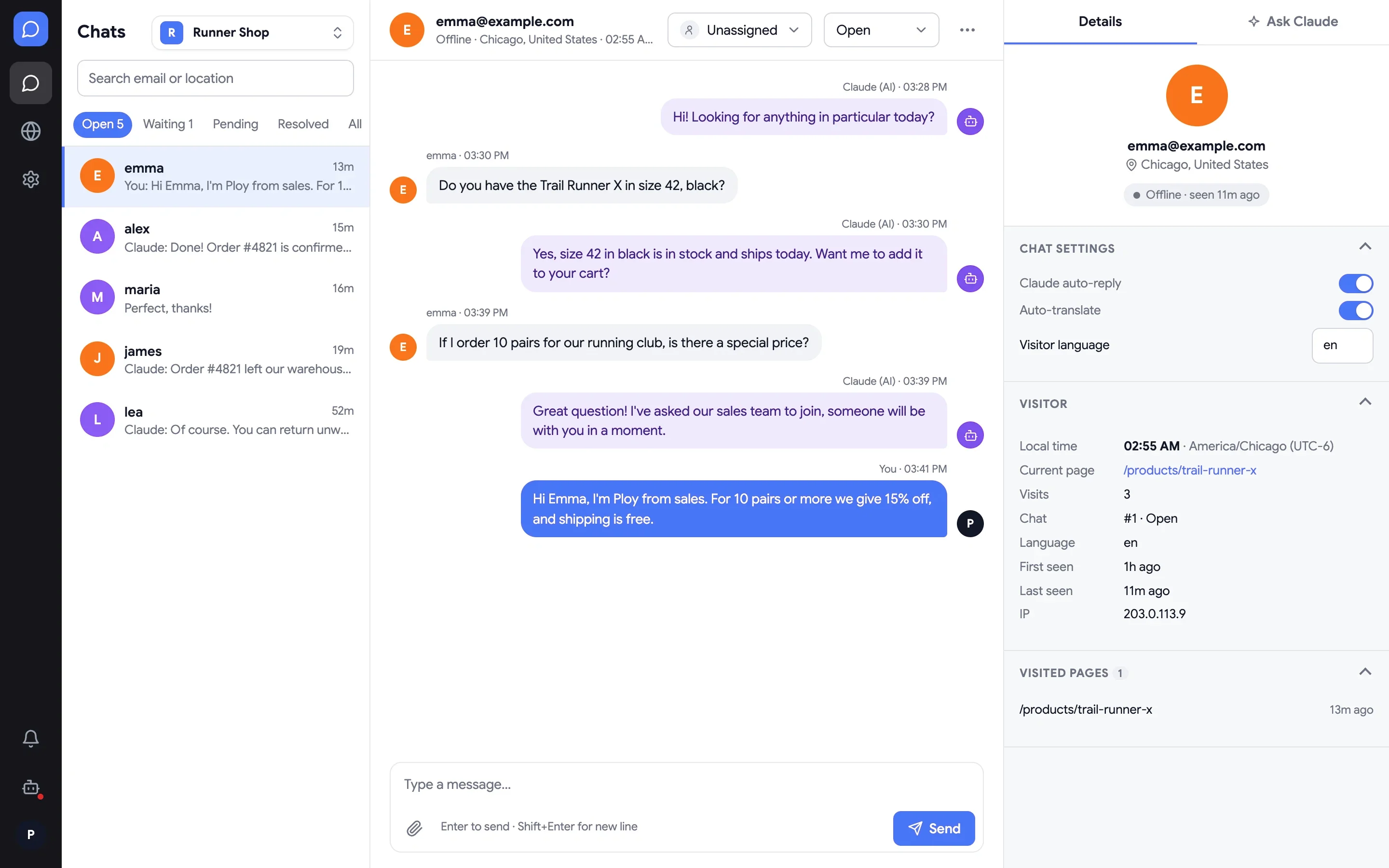
ZocialDM dashboard: an open chat where Claude answered a customer and a sales agent offered a team discount, with visitor details on the right

Chat that does the work, not just the talking

Connect your Claude account, write your rules in plain words, and every chat gets a real answer in seconds.

Answers in seconds

Claude replies to every visitor using your shipping rules, return policy and product info, around the clock.

Takes real orders

Checks live stock and prices from your store, then creates the order and sends a payment link.

Hands off to your team

Visitors can ask for a person at any time. Your team gets an alert on desktop and a push on their phone.

Use case

Let AI handle your orders

Your customer asks for a product in the chat. Claude finds it in your store, confirms the details and places the order. No forms, no waiting for office hours.

See how to set it up
Real recording, not a mockup: Claude checking stock and placing an order through a sample store's API.

Works with WordPress and Shopify

Add the chat in a minute, then connect your store so the AI can create orders for your customers.

WWordPress + WooCommerce

Take WooCommerce orders in the chat

  1. Add the chat: paste your embed code into the footer with the free WPCode plugin.
  2. Create an API key: WooCommerce › Settings › Advanced › REST API, with Read/Write access.
  3. Connect: add the WooCommerce connector in ZocialDM and put your key into its starter instructions.
Read the WordPress guide →
SShopify

Create Shopify orders with a checkout link

  1. Add the chat: paste your embed code into theme.liquid before </body>.
  2. Create an app: in the Dev Dashboard, with product, inventory, order and draft-order access.
  3. Connect: add the Shopify connector in ZocialDM and put the app's client ID and secret into its starter instructions.
Read the Shopify guide →

For a team of one, or a team of many

Run several websites from one account. Each one has its own chat widget, Claude account, rules and team.

See who is on your site

A live list of visitors with their country and current page. Start a chat with one click.

Any language

Visitors write in their language and your team reads in yours. Replies are translated back.

Reply from your phone

Install the app to get push notifications and answer chats wherever you are.

One line of code. Works on any site.

Read the guides

Put a chat on your site that actually works

Answers, orders and handoffs, all in one chat. Set it up today.

Get startedOne line of code
© ZocialDM